Send email from servers you own.
SingleMail is the email sending layer for your applications. Connect with an API, an SDK or SMTP and get DKIM signing, queueing, webhooks and delivery tracking out of the box. All of it runs on your own infrastructure.
No credit card. Or install it on your own server.
import { SingleMail } from "@singlemail/node";
const sm = new SingleMail(process.env.SINGLEMAIL_API_KEY);

await sm.emails.send({
  from: "Optik Dünyası <fatura@optik.com.tr>",
  to: "ayse.yilmaz@gmail.com",
  subject: "Siparişiniz kargoya verildi",
  html: receiptHtml,
});
Where this email went
- QueuedAPI answered in 38 ms
- Signed with DKIMsinglemail._domainkey.optik.com.tr
- Sent250 Ok, accepted by relay
- Deliveredgmail.com, 1.2 s
- Openedwebhook: email.opened
Plugs into the code you already have
Use the SDK for new projects, the REST API for services in other languages, and SMTP for apps you can't change. All three land in the same queue and the same logs.
Node.js SDK
Type-safe client. It never throws on API errors; every call returns { data, error }.
npm i @singlemail/node

import { SingleMail } from "@singlemail/node";
const sm = new SingleMail("sm_…");

const { data, error } = await sm.emails.send({
  from: "App <no-reply@firma.com>",
  to: "musteri@ornek.com",
  subject: "Şifre sıfırlama",
  html: "<p>Kodunuz: 482913</p>",
});
REST API
.NET, PHP, Go, a Flutter backend or n8n. One HTTPS request is all it takes.
curl https://mail.firma.com/emails \
  -H "Authorization: Bearer sm_…" \
  -H "Content-Type: application/json" \
  -H "Idempotency-Key: order-1042" \
  -d '{
    "from": "Fatura <fatura@firma.com>",
    "to": ["muhasebe@musteri.com"],
    "subject": "Ekim faturanız",
    "html": "<p>Fatura ektedir.</p>"
  }'
SMTP
WordPress, Laravel, legacy ERPs. Username singlemail, password is your API key.
# Laravel .env
MAIL_MAILER=smtp
MAIL_HOST=mail.firma.com
MAIL_PORT=2587
MAIL_USERNAME=singlemail
MAIL_PASSWORD=sm_…
MAIL_ENCRYPTION=tls
What it takes to reach the inbox, already done
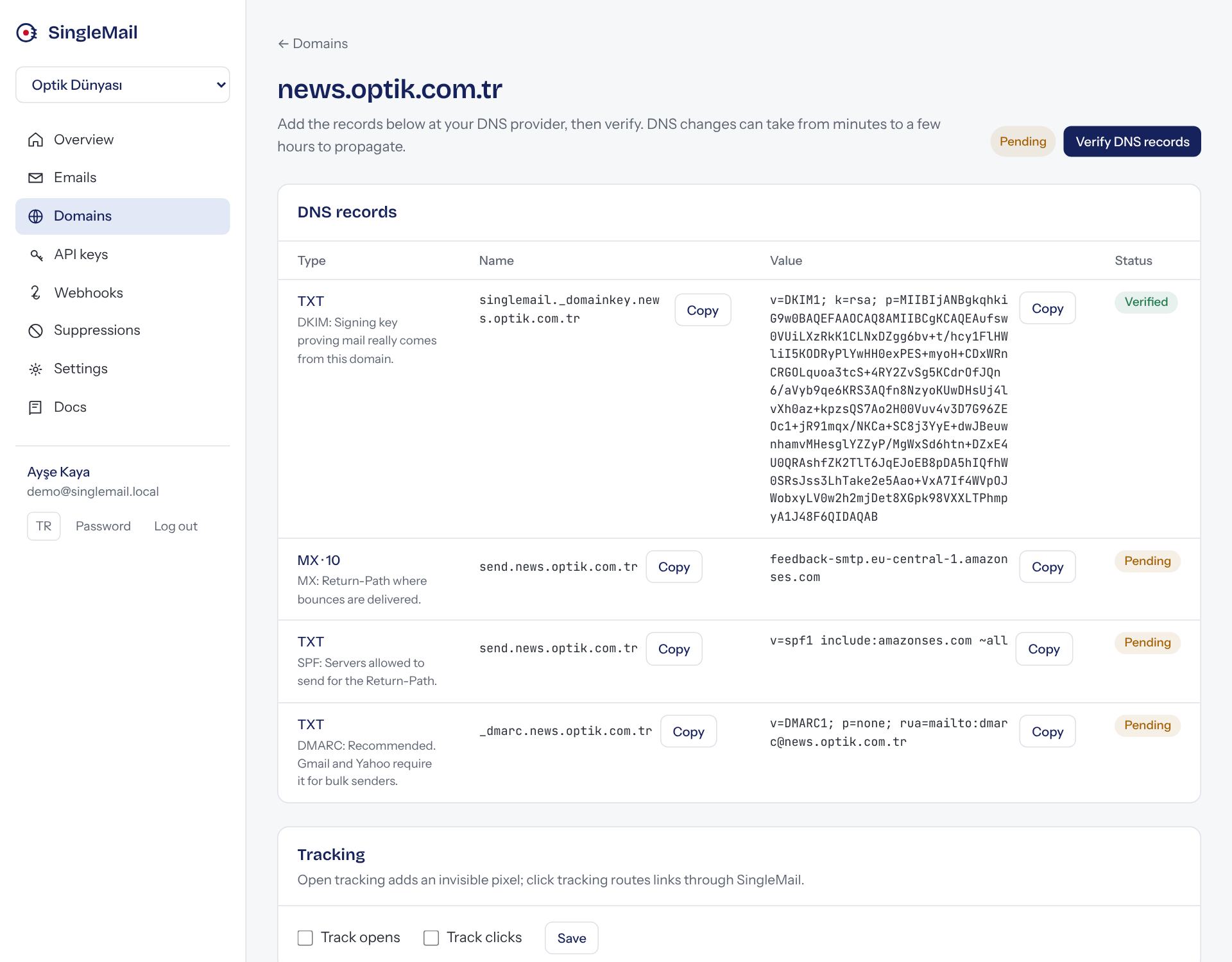
When you add a domain, SingleMail generates a DKIM key just for it and lists the DNS records to add. Add them, press verify, and you're set.
- Every domain is signed with its own 2048-bit DKIM key.
- SPF is checked on a separate Return-Path subdomain, so your existing SPF record stays untouched.
- Addresses that hard-bounce or complain are never mailed again.
- You start compliant with Gmail and Yahoo bulk sender rules (DMARC, low complaint rate).
| Type | Name | Value | Status |
|---|---|---|---|
| TXT | singlemail._domainkey | v=DKIM1; k=rsa; p=MIIBIjANBgkqhkiG9w0BAQEFAAOCAQ8AMIIBCgKCAQEAt3x… | Verified |
| MX | send | 10 feedback-smtp.eu-central-1… | Verified |
| TXT | send | v=spf1 include:amazonses.com ~all | Verified |
| TXT | _dmarc | v=DMARC1; p=none; rua=mailto:… | Verified |
Everything the day-to-day needs
- Scheduled sending
- Pass "in 2 hours" or an ISO date; cancel or reschedule before it goes out.
- Batch sending
- Up to 100 emails per request, for notifications and reports.
- Idempotency
- A repeated request with the same key never creates a second email. Retry safely after network errors.
- Open and click tracking
- Toggled per domain. Links are signed, so events can't be forged.
- Signed webhooks
- Sent, delivered, opened, bounced… Failed deliveries are retried 8 times with growing gaps.
- Separate projects
- One project per client or product: its own domains, keys, logs and quota.
- Scoped API keys
- Full access, or send-only keys locked to a single domain.
- Audit log
- Who changed what in the panel, and when.
Your data stays on your servers
SingleMail installs from a single docker compose file: Postgres, Redis, the API, the sending service and the SMTP gateway. It runs on Coolify, Proxmox or any Linux box. Email content and logs live in your own database, which matters for projects with data-residency requirements.
For final delivery, use Amazon SES, your own Postfix server or any SMTP relay. Switching is a single setting.
git clone …/singlemail && cd singlemail
cp .env.example .env      # relay, domain, secret
docker compose up -d

pnpm sm admin:create siz@firma.com "…"
Two panels for two jobs
Customer panel
Project owners see email logs and HTML previews, and manage domains, API keys, webhooks and blocked addresses.
Manager panel
The team running the platform sees every project, user, queue and health check in one place; suspends projects, sets quotas and can view any account as its owner.
From install to first email, step by step
The docs walk through every screen with real panel screenshots: adding a domain, verifying webhooks, installing on your own server and running the manager panel.
- Send your first emailAccount, domain, DNS, API key and the first send.
- Customer panelLogs, what each status means, key permissions, team.
- IntegrationsNode.js, PHP, .NET, Python, Laravel, WordPress, n8n.
- Install on your serverDocker Compose, .env, Amazon SES, Coolify.